Agile Systems Engineering
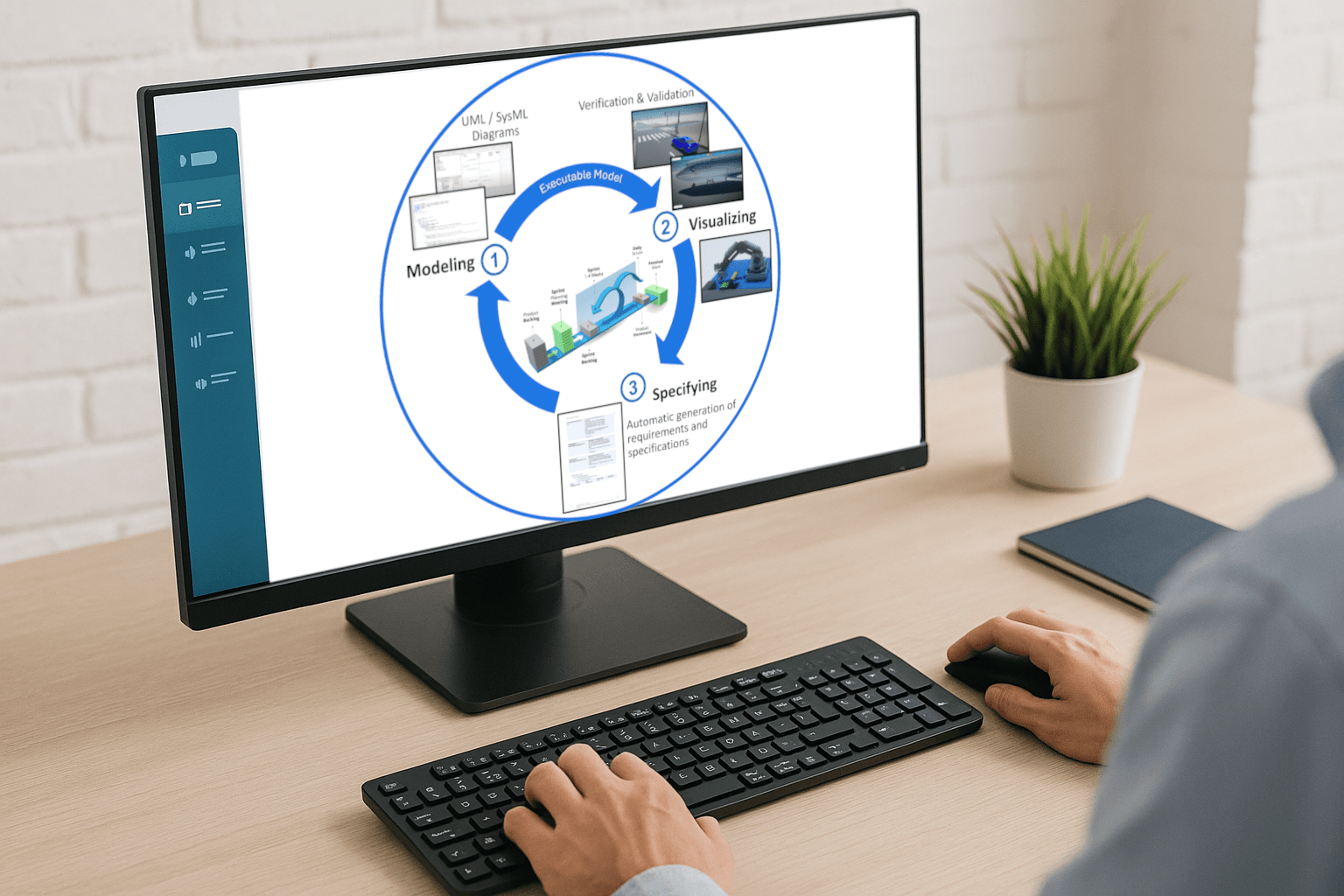
The "Customer in the Loop" tool-enabled process
CIL4Sys has developed an integrated systems engineering process and toolchain that combines agile modeling, simulation-based verification & validation, and automated specification generation. At the heart of the approach is a continuous engineering loop: engineers rapidly build and refine functional system models, verify and validate system behavior through simulation, and automatically generate consistent requirements and specifications from the validated models. Rather than waiting for detailed specifications and physical integration to validate design choices, teams can model, simulate, verify, validate, and** iterate early and continuously throughout the development lifecycle**. Once the expected behavior has been validated, the models become the trusted source for automatically generating system requirements, specifications, and executable software images, ensuring consistency between engineering intent, validated behavior, and implementation. This approach enables engineering teams to explore design alternatives faster, detect issues earlier, shorten specification cycles, and reduce integration risks, while maintaining end-to-end consistency from system requirements to executable representations.
Sim4Sys Designer
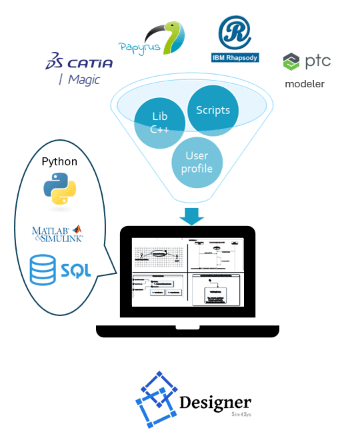
Sim4Sys Designer is a set of add-ons for leading MBSE and system modeling environments, including Eclipse Papyrus, IBM Rhapsody, PTC Modeler, and Dassault Systèmes CATIA Magic.
Sim4Sys Designer guides engineers throughout the modeling process, automates repetitive modeling tasks, and continuously enforces model consistency and engineering best practices.
By embedding methodology and automation directly into the modeling environment, it helps engineers build high-quality system models faster and with greater confidence. From these models, Sim4Sys Designer can automatically generate requirements, system specifications, and executable software images, creating a seamless path from system engineering to simulation and validation.
Its built-in guidance and automation also significantly shorten the MBSE learning curve. Engineers can quickly become productive without first having to master every detail of the underlying modeling environment and methodology.
With just three days of training followed by three weeks of supervised hands-on practice, engineers can acquire the skills and autonomy required to contribute effectively to industrial projects.
Sim4Sys Designer turns modeling tools into guided, automated engineering environments — helping teams model faster, maintain consistency, and move seamlessly from requirements to executable system representations.
Sim4Sys Virtual Bench
Sim4Sys Virtual Bench is a SaaS application designed to run software images within a functional digital mockup playground, enabling distributed teams to collaborate on system design, integration, verification, and validation.
It allows teams to visualize, verify, and validate system requirements early in the development lifecycle, before final implementation and physical integration begin.
Scenarios can be created easily by dragging and dropping objects from reusable libraries into the playground. Parameters of graphical objects can be connected directly to model-object attributes, providing an interactive visualization of the system and its behavior.
The playground includes a controlled simulation clock, enabling real-time and accelerated simulation of dynamic behaviors. Events can be:
- triggered live through the scenario HMI,
- scheduled on a timeline,
- positioned along a trajectory, or
- triggered automatically by functional sensors.
Test criteria can be defined and continuously evaluated while a scenario is running, providing immediate insight into whether expected system behavior and requirements are being met.
Scenarios can then be organized into test plans and executed automatically in batch mode. At the end of the execution, Sim4Sys Virtual Bench generates reports showing the evolution and results of the defined test criteria.
By combining functional simulation, interactive visualization, scenario-based testing, and automated verification in a collaborative SaaS environment, Sim4Sys Virtual Bench helps engineering teams identify issues earlier, validate system behavior sooner, and reduce integration risks before moving to final implementation.
AI Companion
SyneSys – Your AI Companion for Systems Engineering
Our AI Companion, SyneSys, is available as a SaaS solution or can be deployed within your own IT infrastructure. Its user interface is based on standard web technologies, providing easy access through a web browser.
Before deployment, a configuration and validation phase ensures that SyneSys is fully aligned with your engineering environment. This includes configuring:
- the ontologies that reflect your development processes, engineering methods, and domain-specific concepts;
- access to the LLMs selected by your organization;
- the hardware, software, and network infrastructure required to comply with your IT and cybersecurity policies.
Once configured, SyneSys provides engineers with an AI-assisted, step-by-step workflow to transform engineering documents into structured system models.
Users can import existing documents, select a system of interest and the appropriate engineering ontology, and ask an AI agent to propose a modeling strategy. SyneSys then progressively builds the system model according to the proposed steps.
Throughout the process, the engineer remains in control: each modeling step and its results are reviewed and validated before the AI proceeds to the next stage. This Human-in-the-Loop approach combines the productivity of generative AI with engineering expertise and oversight.
The resulting system model is stored in a tool-independent JSON format. It can be visualized through a wide range of** system engineering diagrams**, including architecture views, use cases, sequence diagrams, state machines, and activity diagrams, and can be exported to SysML v2 for integration with the broader MBSE toolchain.
For more information or to request a demonstration, visit the SyneSys website.